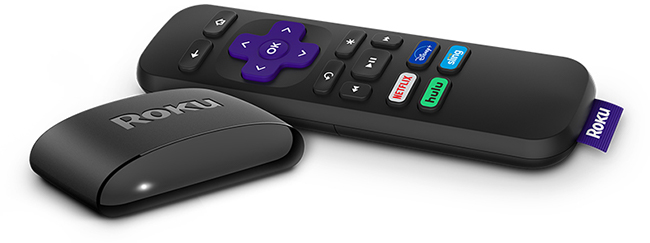
Roku® Express (model: 3960) supports video resolutions up to 1080p Full HD and ships with a Roku Simple Remote. This article describes the product in more detail and outlines the setup steps.
- Note: Roku Express model 3960 replaces Roku Express models 3700, 3900, and 3930. The same steps can be used to set up all models.
Will Roku Express work with my TV?
Roku Express will work for any television with an HDMI® connection. We recommend using the High Speed HDMI Cable that came with your Roku Express. You can order additional cables from the Roku accessories store.
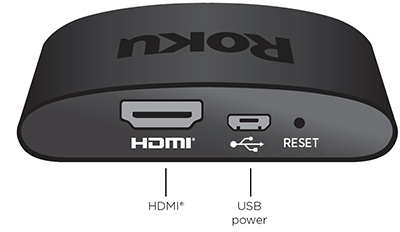
Setting up your Roku Express
- Review the Roku Express Quick Start Guide (model 3960) or the Roku Express Quick Start Guide (model 3960RS)
- If desired, attach your Roku Express using the adhesive strip.
- Use your TV remote to power on your television and select the input where you connected your Roku Express. You should see the Roku logo on the TV screen as your player powers on. Help is available if you do not see any picture on your TV.
- Slide open the battery cover on the back side of your remote and insert batteries. Help is available if you have problems with your remote control.
- Learn what to do if you see a solid red light or flashing red light on the front of your Roku Express.
Connect to the internet
Choose your wireless network from the list of available networks and enter your password. This is often the same network you use to connect your computer or smartphone to the internet. If you do not see your network, select Scan again to see all networks. For more assistance, see help finding your wireless network and password.
If you want to see your password as you type, choose Show password. This can help prevent entering the wrong password. Remember, passwords are case-sensitive. Use the shift button  on the on-screen keyboard to enter a capital letter.
Once you enter your password and select Connect, your device will automatically connect to the internet. Alternatively, you can get more help if you are unable to connect to your wireless network.
Configure display settings
Select Set display type and let your streaming player auto detect the best display resolution so you do not have to manually configure the settings. To change the display type at a later time, go to Settings > Display type.
- Note: This step may be done automatically by your device. If this step is not shown during setup, your device was able to do this step automatically for you.