Depending on which Roku® streaming player or Roku TV™ system you own, you will have one of two types of remote:
- Roku simple remote
- Roku voice remote
This article will help you identify your remote and learn about features available on the current Roku remotes.
- Tip: Visit the product comparison chart to learn about the remotes included with current Roku streaming devices.
How to tell if you have a Roku voice remote
- Tip: Learn more about how to set up your Roku voice remote or fix any voice remote issues.
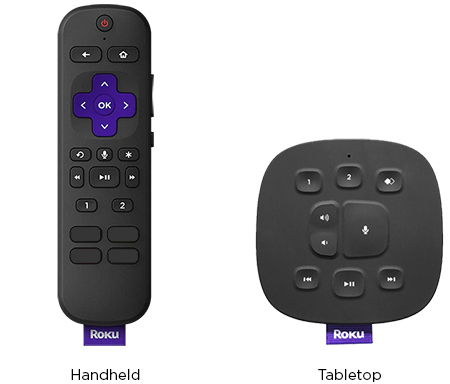
What is the difference between a handheld remote and a tabletop remote?
There are two types of Roku voice remotes as shown below – a handheld variety, and the Roku Touch™ tabletop remote.
Both types have similar features, but if you are specifically trying to set up a tabletop remote, read the detailed article about how to set up your Roku Touch tabletop remote or how to fix any issues with your Roku Touch.
How to tell if you have a Roku simple remote
- Tip: Learn more about how to set up your Roku simple remote or fix issues with your simple remote.
What features does my Roku voice remote have?
Your Roku voice remote may have one or more of the following features, depending on the specific model.