How to restart your smart home device
Many issues can be resolved by restarting your smart home device and then trying to perform the action again. Follow the steps below to restart your smart home device in the Roku Smart Home mobile app. If your device does not have a restart option in the app, alternate instructions are also provided.
- Note: If an update is in progress or stuck, do not restart your smart home device. Restarting your device while an update is in progress can cause issues.
Restart your smart camera
Use the following steps to restart your smart home camera in the app.
- Tap Home
 from the navigation bar
 - Select your device
- Tap Settings
 in the corner
 - Scroll down and tap Restart or Restart Camera
If you are restarting a Roku Outdoor Camera SE, use the following steps instead:
- If your camera is connected to a power source, unplug the power cord
- Open the weatherproof cover on back of the camera
- Slide the power switch to Off
- Wait 30 seconds
- Slide the power switch back to On
- Close the weatherproof cover
Restart your home monitoring system
Use the following steps to restart your Roku Monitoring Hub or Roku Home Monitoring Accessories.
Roku Monitoring Hub: Hold the Reset button, located on the back of the hub, for 8 seconds and then release the button.
Roku Home Monitoring Accessories: Remove the batteries from the home monitoring accessory and then reinsert the batteries.
Restart your video doorbell
Use the following steps to restart your Roku Video Doorbell & Chime SE or Roku Wire-free Video Doorbell & Chime SE
Wired doorbell installation:
- Locate the breaker switch that controls power to your doorbell
- Flip the switch to the OFF position
- Wait 30 seconds
- Flip the switch to the ON position
- Warning: If you are unsure which breaker switch controls your doorbell or you are uncomfortable with the steps, contact a licensed electrician for assistance.
Wireless doorbell installation:
- Loosen the security screw at the bottom of the doorbell
- Remove the backplate of your doorbell by sliding it down then pulling it away
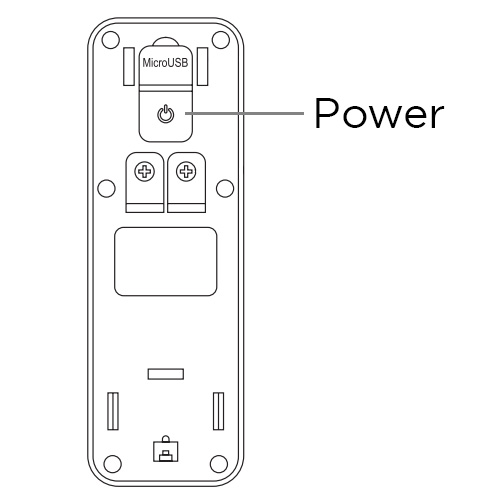
- Press the Power button to turn the doorbell off
- Wait 30 seconds
- Press the Power button again to turn the doorbell on
Restart your smart bulb
If you are restarting a Roku Smart Bulb SE (Color) or Roku Smart Bulb SE (White), turn off the bulb manually with the light switch and then turn it back on.
Restart your smart light strip
If you are restarting a Roku Smart Light Strip SE or Roku Smart Light Strip+ SE, unplug the light strip from the power source and then plug it back in.
Restart your smart plug
If you are restarting a Roku Indoor Smart Plug SE or Roku Outdoor Smart Plug SE, unplug the smart plug from the power source and then plug it back in.